Professional School Website Design That Keeps Families Informed, Meets Accessibility and Language Requirements, and Tells Your Story
Custom websites for Bay Area school districts, charter schools, and private schools that make enrollment, calendars, and communication easy for every family, in every language
KO Websites designs school websites and school district websites that treat these requirements as design inputs. We build family-first navigation, accessible documents, language access, and consistent templates that your staff can maintain.
Best School Website Design: Bay Area and California Examples That Serve Families
The best school and district websites share one goal: help a parent finish a task in a few taps, whether that parent is on a phone, using a screen reader, or reading in a language other than English. The ten districts below, seven in the Bay Area and three elsewhere in California, each run their own full website and show different ways to do that, from a single consolidated platform to networks of dozens of school sites, from published language data to a chatbot and an accessible document library.
1. San Francisco Unified School District (sfusd.edu)
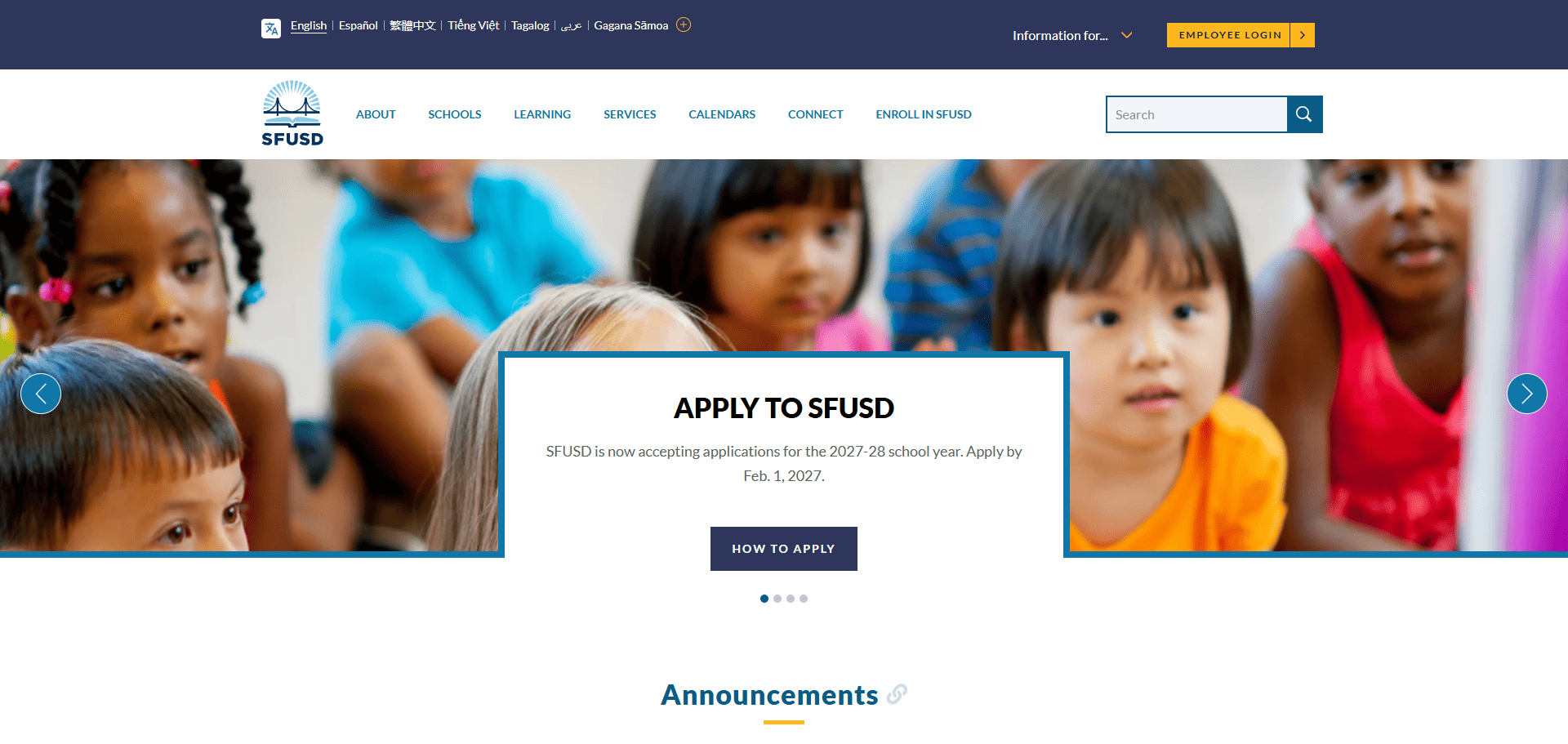
San Francisco Unified serves more than 50,000 students who speak more than 44 languages across 132 schools, and its website shows how to organize that complexity. Since 2019, the district has moved its public pages, employee content, school websites, and department sites onto a single Drupal-based community site, with a stated goal of “one district, one website.” The navigation starts with the people who visit: “Information for” links lead to Families, Students, Employees, Community, and Job Seekers, and each item in the main menu, from About and Schools to Learning, Services, Calendars, Connect, and Enroll, carries a one-sentence description of what visitors will find. Quick links surface the most-used tools, including the Family Portal, enrollment, calendars, school meals, Know Your Rights, and a way to report a concern. A Student, Family, and School Resource Link offers help by email, phone, or an online form. After user feedback, the district made translation easier by placing a language selector at the top left of every page, and a website feedback link and accessibility page sit in the footer. In 2026 the district also opened a procurement for a comprehensive redesign focused on visual design, accessibility, and usability for families, students, and staff. For large districts that need one front door, SFUSD is the benchmark.
2. Oakland Unified School District (ousd.org)
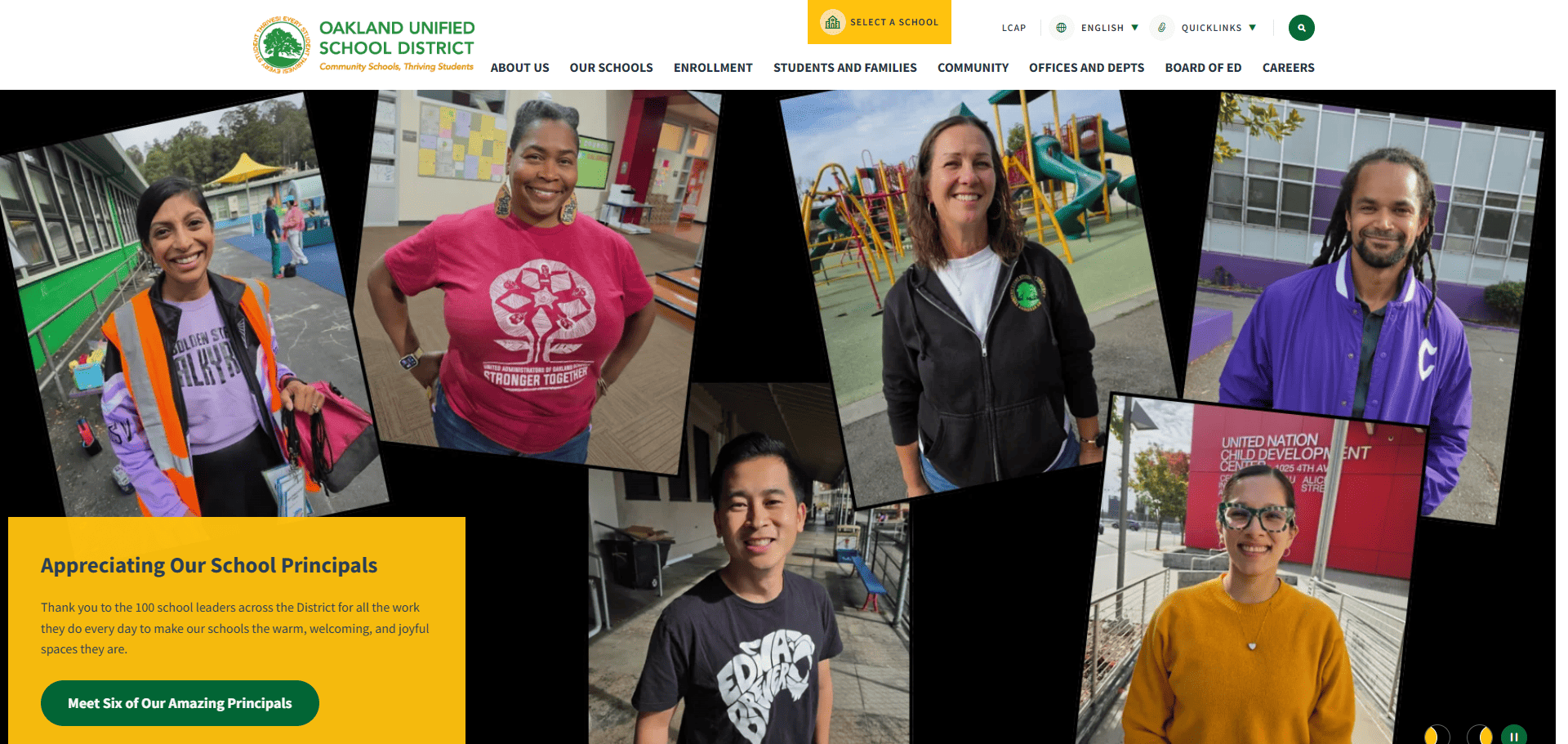
Oakland Unified combines a district hub with a separate website for nearly every school. A “Select a School” menu groups dozens of elementary, middle, high, and alternative school sites, each on its own address, such as acornwoodland.ousd.org or oaklandtech.ousd.org, while the district site handles enrollment, the LCAP, School Accountability Report Cards, School Plans for Student Achievement, public notices, and board materials. The enrollment section has a clear path with an “Enroll Now” button and a school finder, and a footer lists the district’s ADA, Title IX, and Section 504 coordinators by name and contact. The district’s Interpretation and Translation Unit page explains how language access works in practice. It describes the 15 percent rule under Education Code 48985, reports that 56 school sites meet the threshold for Spanish, nine for Mam, two for Arabic, and one for Cantonese, lists the dedicated staff who provide interpretation and translation, and explains how sites request help. It also describes community navigators who support newly arrived families in languages such as Karen, Burmese, Tigrinya, Amharic, Dari, and Pashto. With about 30 percent of students identified as English learners, that transparency matters. For districts with many languages and many school sites, Oakland is a strong example.
3. Fairfield-Suisun Unified School District (fsusd.org)

Fairfield-Suisun Unified is a good example of tackling one of the hardest parts of school accessibility: documents. In July 2026, the district announced that it had made more than 2,000 public documents accessible, including archived and legacy content such as school documents, event flyers, and budget plans, rather than waiting for the April 2027 federal compliance date. Using a document accessibility service from CivicPlus, the district converts PDFs into searchable, translatable pages aligned with WCAG 2.1 Level AA, with an interactive outline for longer documents, a feature that lets visitors ask questions in plain language, support for more than 250 languages, full keyboard navigation, and mobile-friendly viewing even for older scanned files. Through a partnership with Aira, the community also has free access to live visual interpretation and complimentary help navigating documents and forms, in English and Spanish. The district reported that roughly one-third of its families speak a language other than English at home, and the platform gives staff analytics on which documents are most popular, which questions families ask most often, and which languages are used. The rest of the site keeps essentials one click away: board agendas, registration, a staff portal, a language selector, and footer links to legal requirements, nondiscrimination, SARCs, Title IX, a public records portal, and immigration resources. For districts facing a backlog of PDFs, Fairfield-Suisun is the model.
4. San Ramon Valley Unified School District (srvusd.net)
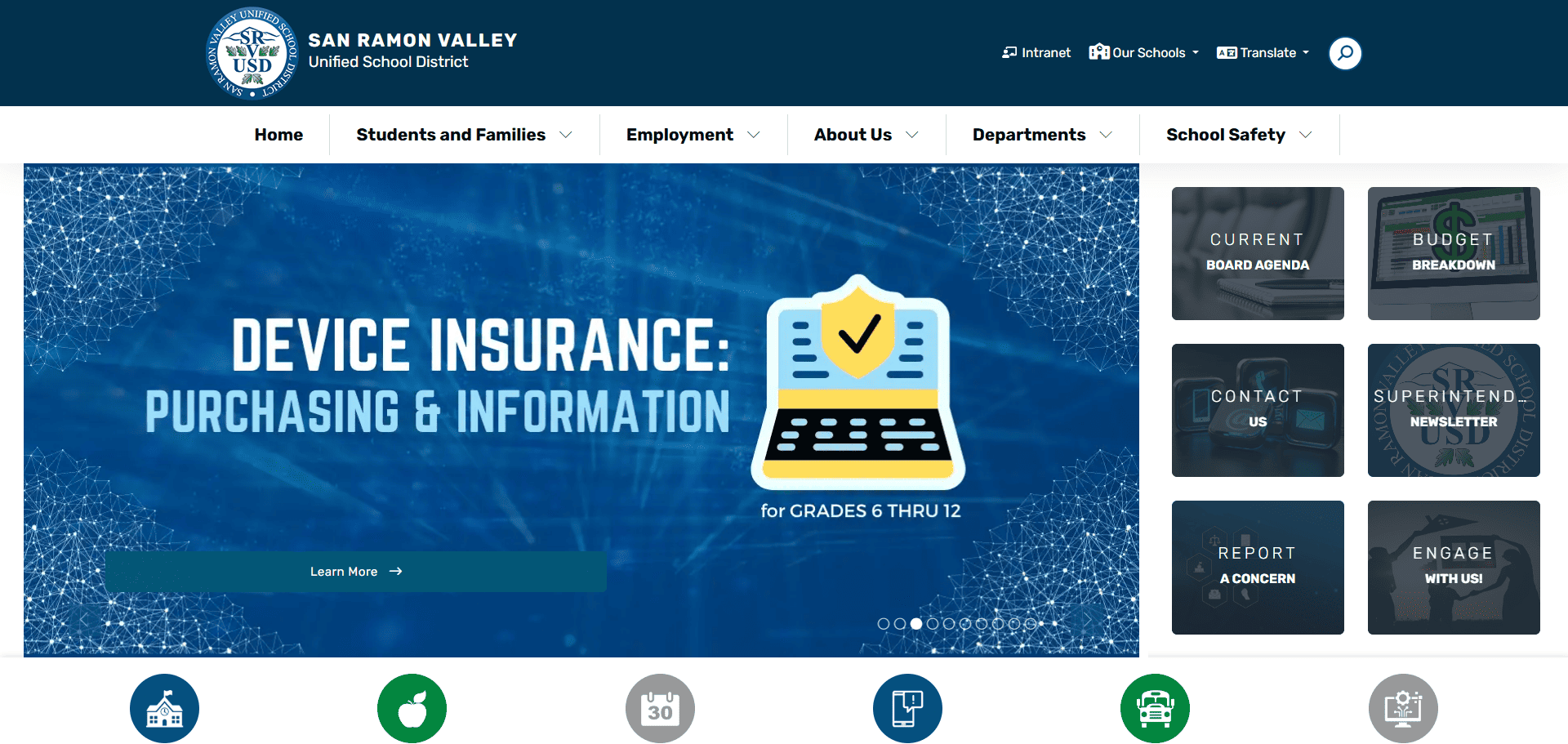
San Ramon Valley Unified serves about 30,000 students in Alamo, Blackhawk, Danville, Diablo, and San Ramon, and its website puts access tools at the top of every page. A translate bar offers 18 languages, including Chinese, Spanish, Vietnamese, Tagalog, Korean, Farsi, Hindi, Punjabi, and Khmer, a high-contrast toggle lets visitors change the display, and a site search and a “Find a School” box sit beside them. Nearly 40 schools each have their own website on a shared address pattern, such as ales.srvusd.net or chs.srvusd.net, so families can move between the district and school sites easily. The Students and Families menu is organized by what parents do, with sections for academic information, enrollment, online services such as an Infinite Campus Info Hub with FAQs for parents and students, and resources that include immigration resources and an annual notice of parents’ rights and responsibilities. A footer block gathers compliance resources, including nondiscrimination and Title IX information, uniform complaint procedures, and Williams complaints, in one place. The district’s ParentSquare page, for a new communication platform effective July 1, 2026, shows how to support a launch: early-adopter schools first, quick-start guides, app download links, and automatic translation in more than 180 languages. For suburban districts with many campuses, SRVUSD is a clear model.
5. Fremont Unified School District (fremontunified.org)
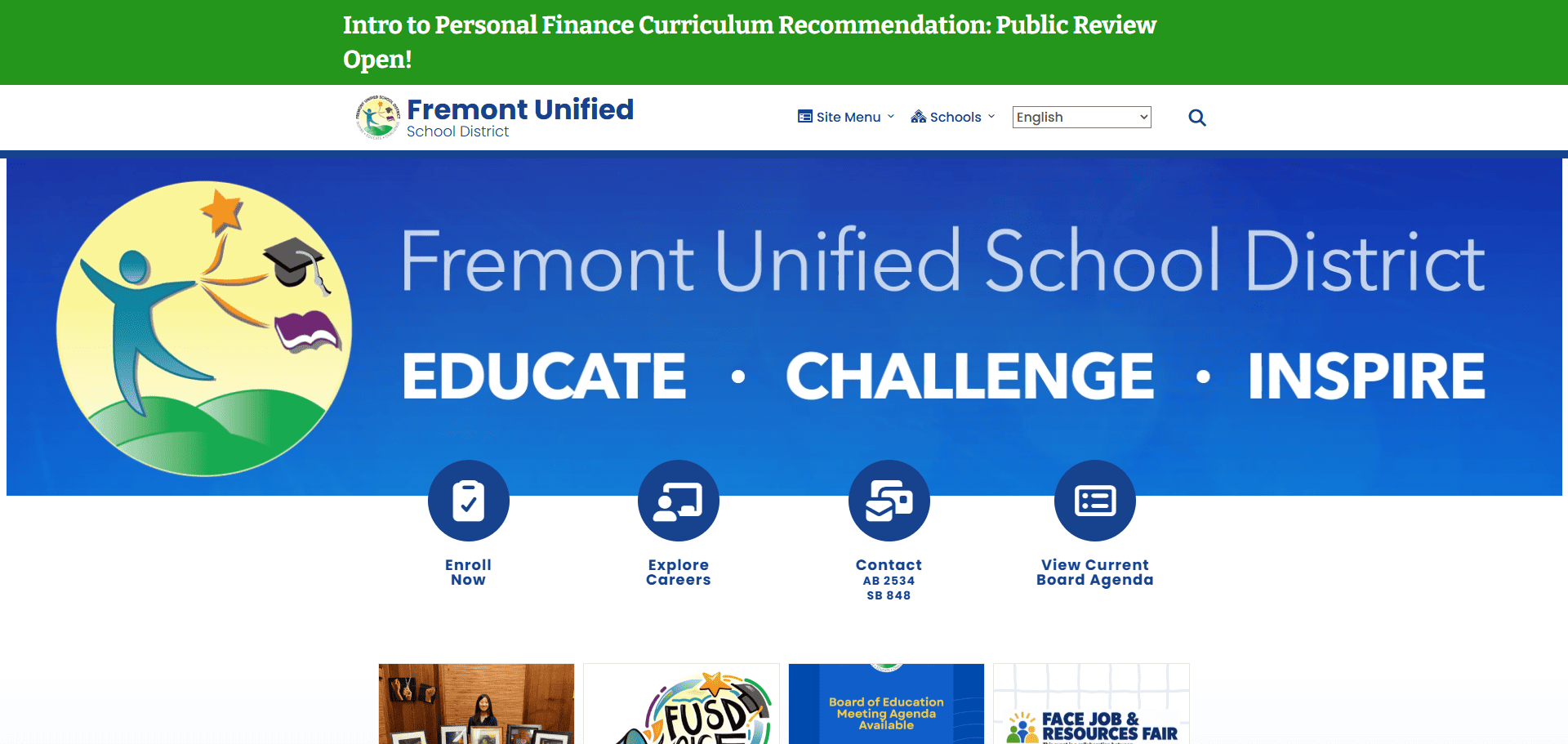
Fremont Unified launched new district and school websites in June 2023 on a new domain, fremontunified.org, and handled the move with a clear public message. The announcement explained that links using the old fremont.k12.ca.us address would redirect to the new pages, that email addresses were not affected, that adjustments would continue after launch, and that staff information was moving to a separate staff website. The site is notable for how openly it publishes language access data. A page titled “Schools – 15% and Above Translation Required” lists each school’s enrollment, the number of English learners and fluent English proficient students, the total percentage, and the top language, with Spanish and Mandarin appearing across many campuses, and then quotes the text of Education Code 48985 so families can see why notices are translated. The site map shows a broad range of family services, from health topics, vision and hearing screenings, and families-in-need resources to income tax filing assistance and a community conversation page. The district also adopted ParentSquare for home-to-school communication and links to training and help videos from a central logins page. For diverse communities where multiple languages meet the 15 percent threshold, Fremont is a transparent example.
6. South San Francisco Unified School District (ssfusd.org)
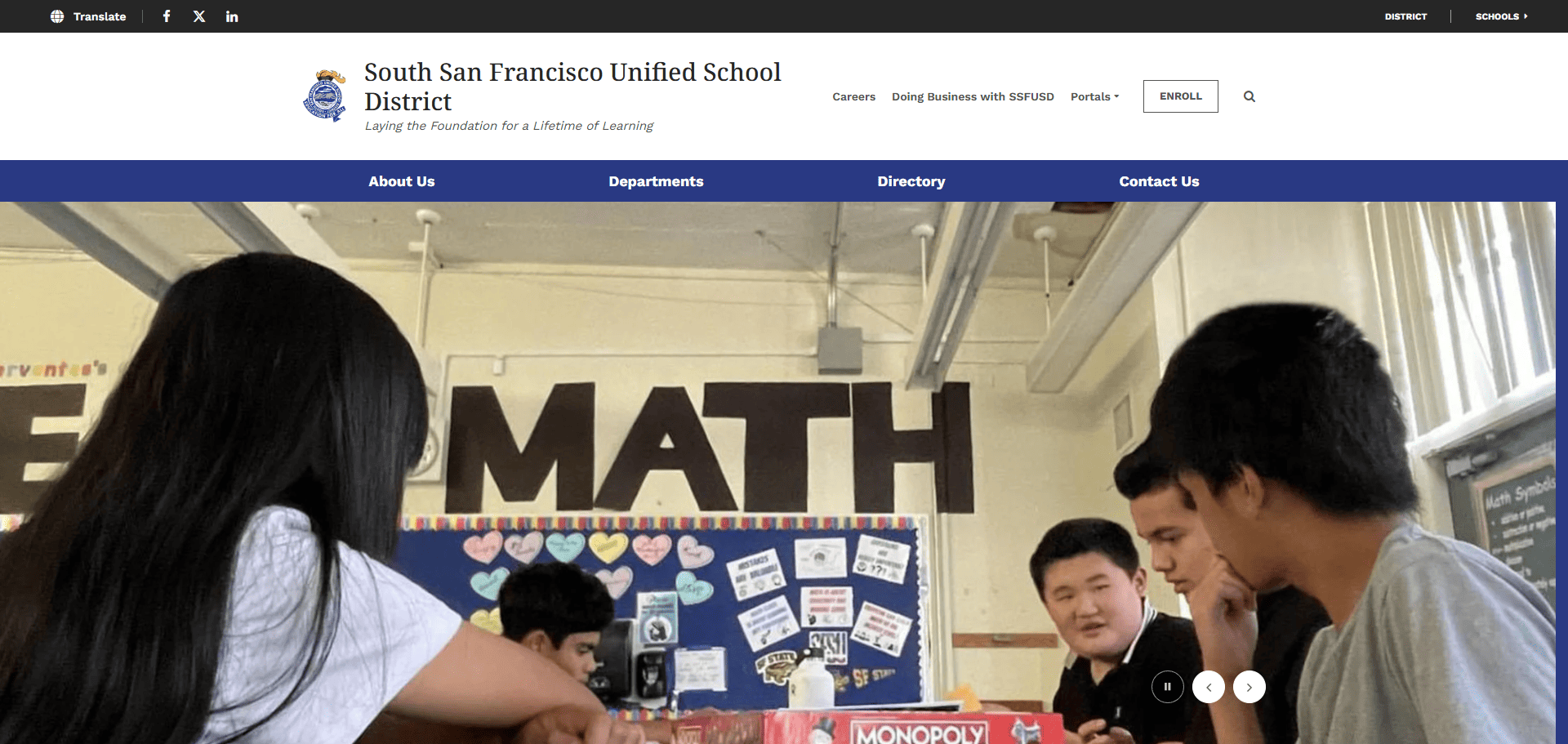
South San Francisco Unified launched a network of 17 websites at once, covering the district office, elementary, middle, and high schools, a continuation school, and its adult education program, and the shared design is the point. All 17 sites use a similar design and architecture, so a parent who learns one site can use any of them. A “Welcome to Our New Website” page explains the five features the district built in: responsive design that works on desktop, phone, or tablet; dynamic content that is tailored to each school but can be shared across sites when needed; language tools that let visitors change the language of any site with one click; streamlined navigation for grades, bell schedules, calendars, and messages from the superintendent and school principals; and social media feeds on every site. The page includes a table that lists every school and its official web address, such as buriburi.ssfusd.org and elcamino.ssfusd.org, so families can find the right site quickly, and it invites feedback. The district’s stated goals were to improve internal and external communication and strengthen its visual identity. For districts that want each school to have its own site without losing consistency, South San Francisco is a strong example.
7. Palo Alto Unified School District (pausd.org)
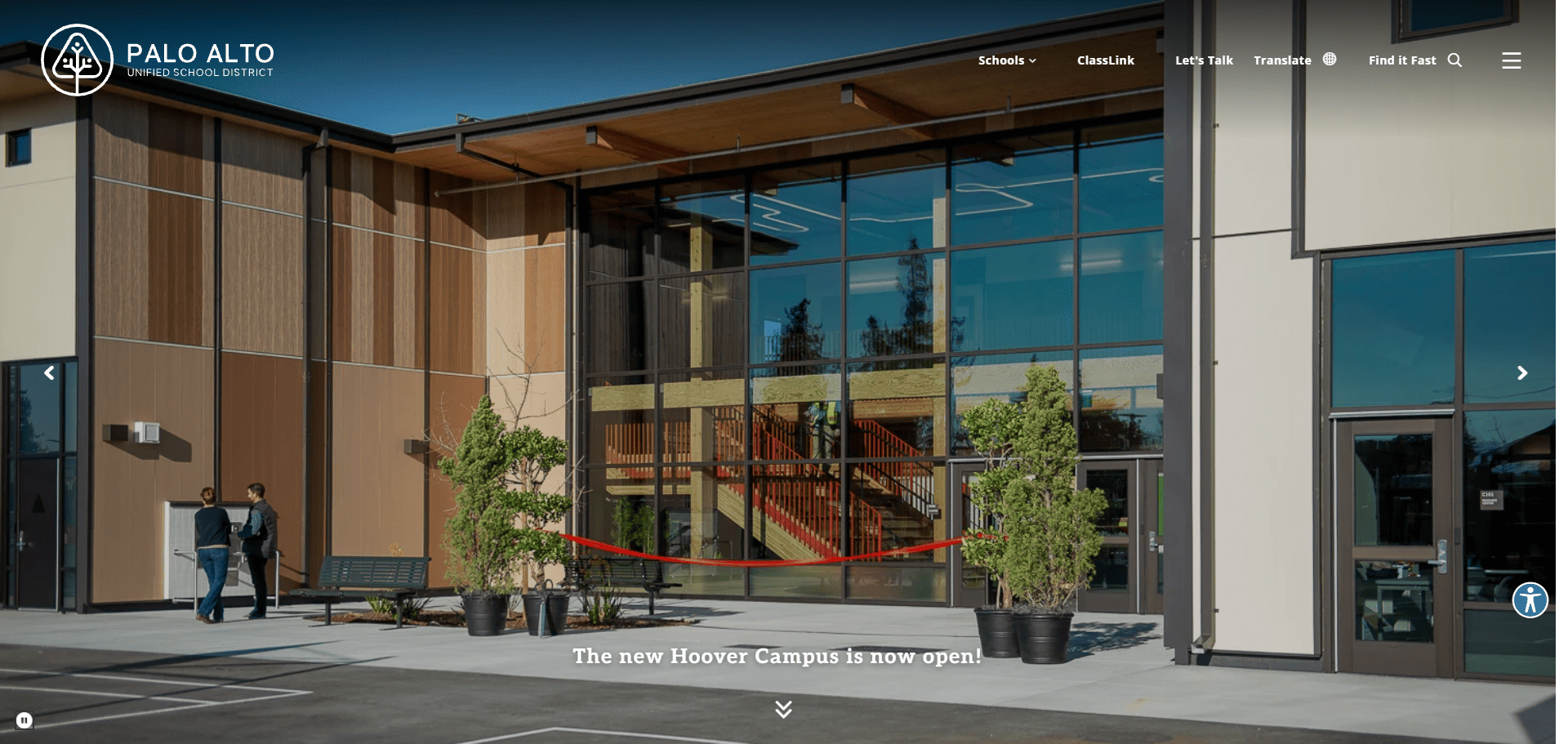
Palo Alto Unified runs a district site and a separate site for each school on a shared address pattern, such as hays.pausd.org and gunn.pausd.org, with a consistent menu on every school site: School Life, Learning, Connecting, and About Us. Under School Life, parents find attendance, calendars, daily schedules, handbooks, health services, lunch, and safety policies; school resources include a link to the School Accountability Report Card; and quick links cover the calendar, contact information, news, and the non-discrimination policy. A ClassLink login connects families and students to their tools, and a Schools menu lists every elementary, middle, and high school. The district also publishes a Web Accessibility Notice that explains its commitment to accessible websites under Section 504 and Title II of the ADA, names the technical standards the district follows, invites visitors to report trouble through a “Let’s Talk” feedback form with the URL, the problem, and contact information, and explains how to file a uniform complaint about accessibility. Because the federal rule now sets WCAG 2.1 Level AA as the technical standard, a notice like this is a natural place for districts to confirm and update the standard they follow. Footer links cover the privacy policy, non-discrimination, and Title IX. For districts that want a clear accessibility notice and consistent school sites, Palo Alto is a useful reference.
8. Napa Valley Unified School District (nvusd.org)

Napa Valley Unified’s new website, featured in a Finalsite roundup of notable school sites in March 2026, shows how a district can combine storytelling with fast access to information. The homepage opens with a montage slideshow of moments from across the district, followed by tabbed content that explains the district’s vision, mission, values, and strategic plan. Fast facts and mobile-friendly icons bring forward what families look for most, such as enrollment details, athletics, calendars, and menus, and a vertical scrolling section on why students choose the district uses icons and imagery to make the content easy to scan on a phone. A full-width map of schools helps families see where campuses are across the Napa area, and news updates and Instagram posts keep the page feeling current. Inside the site, tabbed elements keep leadership pages organized, with information on the superintendent, instructional services, and human resources. The enrollment page lays out each step families must follow, supported by video, and the district called out what is new for returning visitors who expected the old layout, with links to popular resources like enrollment, programs, and partnerships. For districts that compete for enrollment and want families to feel welcome, Napa Valley Unified is a clear example.
9. Sacramento City Unified School District (scusd.edu)
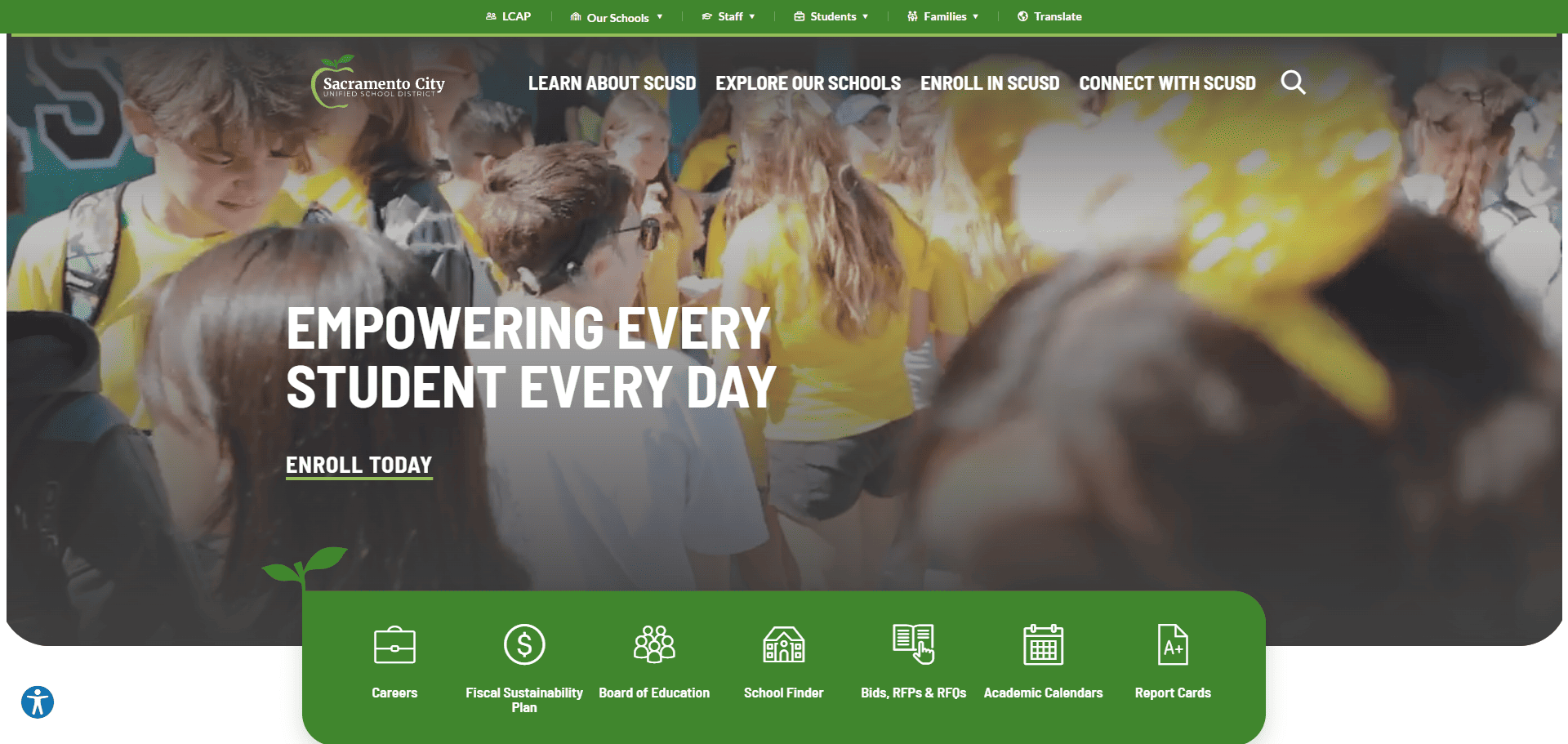
Sacramento City Unified, in the state capital region, presented its website project to the school board in a plain, step-by-step format that other districts can learn from. The district listed why a new site was needed: the old one was outdated, hard to navigate, cluttered, did not meet current accessibility standards, and lacked storytelling. It then showed its timeline: vendor reviews and a family survey in 2023–24, board approval of a Finalsite contract in August 2024, planning of navigation and meetings with departments and schools in 2024–25, and a tentative launch in summer 2025. The consolidation numbers are striking: all district and school websites moved under the scusd.edu domain, reducing 93 websites on different hosts to 77 on one host, with shared content from a single source for consistency on enrollment and outreach. The plan includes WCAG 2.2 Level AA with built-in guardrails for staff, AI-powered translation, a protected employee section, school-branded sites with consistent templates, and school menus, bell schedules, calendars, and handbooks shown as on-page content instead of only downloads. The district also limited published content to the current and two previous school years, with older archives kept offline, converted files into text where possible, and put uploaded files through an accessibility check. For districts with many sites on many platforms, Sacramento City is a clear consolidation example.
10. Chula Vista Elementary School District (cvesd.org)
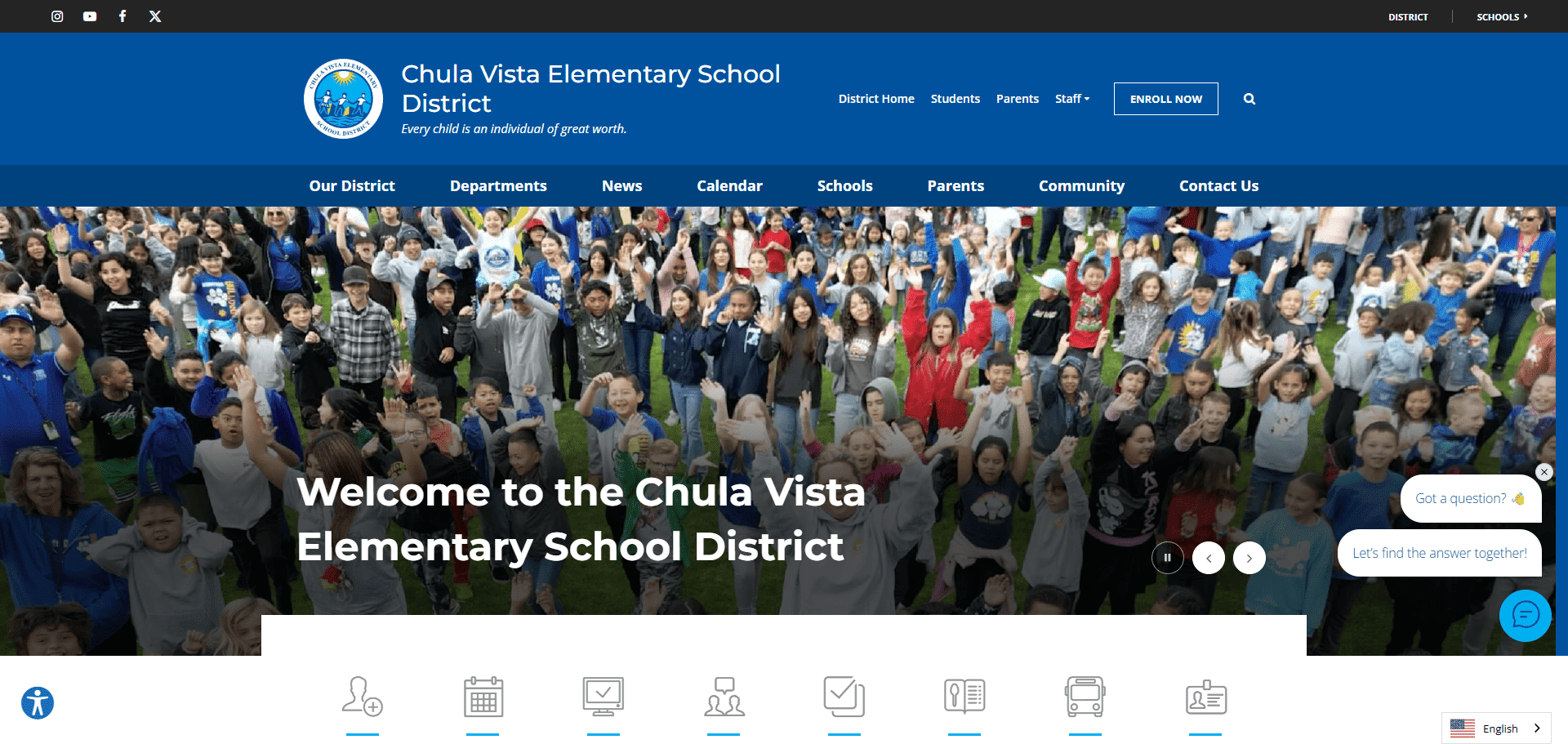
Chula Vista Elementary School District, in San Diego County, runs a district site and a separate site for each of its roughly four dozen schools, including charter schools, and it recently added tools that make help easier to find. In the 2025–26 school year, the district debuted redesigned websites with numerous accessibility improvements and an improved internal search, designed to make sure visitors reach the most up-to-date information. It also launched a chatbot that provides real-time and after-hours support, helps users find quick answers to common questions, and redirects more complex questions to the right department. A Navigation Guide on the district website explains how to use these tools. Each school site follows the same structure: School Info, with attendance, health, nutrition, programs, schedule, safety, school rules, and the School Accountability Report Card; Calendar; and For Families, with family engagement, licensed childcare options, military families, and a mobile app. District, Students, Parents, Staff, and Enroll Now links sit at the top of every school site so a parent can move between levels without searching, and an accessibility statement is linked in the footer. For districts with many small schools and limited staff time, Chula Vista Elementary is a practical example.
Whether the strongest feature is a single front door, a published language census, an accessible document library, or a chatbot that answers questions after hours, each district above succeeds because it starts with what families need to do. If your school or district serves the Bay Area, KO Websites can help you plan and build a website that is accessible, multilingual, and easy to maintain. Contact us today for a free consultation.
What Sets Our School Website Design Apart
Family-First Navigation
Parents arrive to enroll, check a schedule, report an absence, or find a menu, usually on a phone. We organize navigation by family task, put the top actions on the homepage, and keep district and school sites consistent. Our web design process starts with what families need to do.
Accessible Pages and Documents
The ADA Title II rule covers public school districts’ websites and mobile apps, and most school content lives in PDFs: handbooks, newsletters, flyers, and budgets. We design accessible templates, convert key documents into on-page content, and set up accessibility checks so staff publish compliant content from the start.
Language Access Built In
California requires translated notices when 15 percent or more of a school’s students speak a single primary language other than English. We plan language selectors, prioritize which pages and notices to translate first, and write Spanish-language content that reads naturally, not like raw machine output.
Compliance Without the Clutter
Districts must post items like the LCAP, Title IX information, and SARCs, and schools must keep them current. We create a clear, findable compliance center and footer so required notices are visible without crowding the homepage. See how we approach government and agency web design across the Bay Area.
Complete School Website Package
Enrollment and Registration Paths
Clear steps for TK-12 enrollment, transfers, school finders, boundary lookups, tours, and registration links, designed so families can start in a few taps.
Calendars, Alerts, and Daily Essentials
District and school calendars with subscription options, urgent alert banners, bell schedules, menus, transportation, attendance reporting, and a staff directory on every school site.
Compliance and Notices Center
A findable home for the LCAP, SARCs, Title IX and nondiscrimination notices, uniform complaint procedures, board agendas, and public records requests, linked from the footer of every page.
Language and Accessibility Tools
Language selectors, translated key pages, high-contrast and text options, accessible documents, and a published accessibility statement. These connect to your ongoing website management so content stays current.
Specialized School Digital Solutions
District Website Redesign
Research, information architecture, content audits, design, and implementation for your district site, informed by family surveys, analytics, and staff input.
School Site Templates and Networks
Consistent, school-branded templates for dozens of campuses, with shared district content and room for each school’s identity, so staff manage less and families find more.
Accessibility Audits and Document Remediation
WCAG 2.1 AA audits of pages, templates, forms, and PDFs, with prioritized fixes and a plan for handbooks, flyers, and archived documents.
Spanish and Multilingual Content
Spanish-language pages, translation planning based on your school language data, and multilingual landing pages for enrollment and key family services.
Enrollment Marketing and SEO
Search optimization, Google Business Profile updates, and enrollment campaigns that help charter schools, private schools, and districts reach families searching for schools near them.
Platform Migration and Consolidation
Planning for moves between platforms, domain changes, and consolidation of scattered school sites, with redirects so links and search rankings keep working.
Training, Governance, and Ongoing Management
Editor training, content standards, review calendars, and ongoing updates so every school keeps its site current. Ready to see how this works in practice? Explore our portfolio.
Serving Bay Area Schools and Districts
Bay Area schools range from large urban districts to small elementary districts and independent schools, and each community has its own languages and priorities. We work with districts, charter schools, and private schools across San Francisco, Oakland, San Jose, and Silicon Valley, as well as San Leandro, Castro Valley, Pleasanton, Livermore, and San Ramon. We shape content and design to match your families.
Beyond Web Design: Complete Digital Communication
A strong school website works best when it is supported by consistent outreach. Our SEO strategies help families find your school and enrollment information when they search. Local search optimization keeps school addresses, hours, and contact information accurate across Google Maps and directories. Social media marketing supports enrollment drives, events, and community stories, while video production creates school tours, welcome videos, and program highlights. Ongoing website management and hosting keeps your site secure, updated, and reliable.
Your Questions About School Web Design Answered
Do the ADA web accessibility rules apply to school districts?
Yes. Public school districts are covered by Title II of the ADA, and the Department of Justice’s rule adopts WCAG 2.1 Level AA as the technical standard for their websites and mobile apps. The compliance dates are April 26, 2027 for governments serving 50,000 or more people and April 26, 2028 for smaller ones, so your district’s population determines the date. Private schools are generally covered by Title III instead, which has no federal WCAG deadline but still carries legal risk. Your district’s counsel should confirm which date applies.
What does California require us to post on our website?
The California School Boards Association’s sample exhibit on district and school websites lists 34 items that state law requires districts and schools to post, grouped into materials to display prominently, such as the LCAP and Title IX information, and other postings. SARCs must also be available online. Requirements change, so we build a compliance center your team can update and recommend that your board and counsel review it each year.
How do the 15 percent translation rules affect our website?
Under Education Code 48985, when 15 percent or more of a school’s students speak a single primary language other than English, notices to parents must also be provided in that language. We help you use your district’s language data to decide which pages, forms, and notices to translate first, and we design language selectors so families can switch languages easily.
Can you work with the platform our district already uses?
Yes. Many districts use education-focused platforms such as Finalsite, Apptegy, or CMS-based systems, and some run on Drupal or WordPress. We can work within the platform your district has chosen or help you evaluate options, and we focus on information architecture, templates, content, accessibility, training, and migrations.
What should we do about all our PDFs?
Start by deciding which documents families actually need. Many districts convert key handbooks, schedules, and menus into on-page content, remove outdated files, and run accessibility checks on everything that stays. We help you build a plan and a simple process, so new documents are accessible before they are published.
Can you help charter and private schools with enrollment?
Yes. Beyond design, we help schools that compete for enrollment with local SEO, Google Business Profile optimization, landing pages for programs and tours, and campaigns that reach families searching for schools in your area.
What ongoing support do you provide after launch?
We provide hosting, security updates, backups, editor training, and content support so your site stays current at the start of every school year. See what our clients say in our testimonials section.
Build a School Website That Families Trust and Can Actually Use
Families want to enroll, check a schedule, and find help, quickly and in their own language. A well-planned school website makes that simple, supports every family, and helps your district meet accessibility, language, and posting requirements. KO Websites helps Bay Area schools do exactly that.